Oni Central Forum
You are not logged in.
- Topics: Active | Unanswered
#1 09/14/09 16:09
- EdT
- Moderator
- From: Los Angeles, CA
- Registered: 01/13/07
- Website
SoftImage (XSI) Mod Tools - Tips, Techniques and Tutorials
Since a few of us are starting to use SoftImage's Mod Tools, I thought we can have a thread to share things we learned about Mod Tools that can be helpful for others.
Keyboard Shortcuts:
SPACE - Select mode
h - Hide selected object
x - Scale
c - Rotate
v - Move
z - pan zoom camera
o - orbit camera
p - dolly camera
g - grid
Shortcuts to common operations:
Go to the View Menu then select Optional Panels - Main Shelf
To import DAE files:
Go to the File then select Crosswalk - Import
Tip: At the top of the Select File window there is a Favorites Icon. Use that to remember the location of your DAE files.
Some Introduction to Mod Tool Videos:
http://www.youtube.com/watch?v=oYtsbdeG8VI
http://www.youtube.com/watch?v=tASEhszibjs
Softimage-XNA Integration Tutorial (In this tutorial you will use the Softimage ModTool to model, texture, rig and animate a robot soldier for use in XNA game development.)
http://www.noesisinteractive.com/xnabot/
XSI video tutorials from CGTutorials.com:
http://www.cgtutorials.com/c6/SOFTIMAGE_XSI
XSI Beginner Tutorial:
http://developer.valvesoftware.com/wiki … r_Tutorial
Download Mod Tools:
http://usa.autodesk.com/adsk/servlet/pc … d=13571257
Last edited by EdT (02/03/10 12:02)
Offline
#2 09/14/09 16:09
- Samer
- Member

- From: Lebanon
- Registered: 09/04/09
- Website
Re: SoftImage (XSI) Mod Tools - Tips, Techniques and Tutorials
Edt that is great ! I was just posting on another topic there should be a tutorial for it ...
I'm still overwhelmed with the program ... and haven't been able to ... well to do anything with it  i found the camera options to be very hard to get used to ... unlike blender in which u just middle clicked and dragged in any direction ...
also when I imported 2 daes ... they seemed to merge into one scene and appeared on top of each other ...
the tip on the favorites icon is very useful, it was getting on my nerves to browse many folder levels each time ...
hopefully the more experienced users can also give us some tips ^_^
Join our Oni Facebook Group
Check My YouTube Channel for my Oni Videos.
Check My Wiki page for all my stuff
Offline
#3 09/14/09 16:09
- Iritscen
- Moderator

- From: NC, USA
- Registered: 10/22/07
Re: SoftImage (XSI) Mod Tools - Tips, Techniques and Tutorials
Thanks, EdT, we need a post like this to avoid answering the same questions again and again. I plussed you :-3 Don't know what it does, but hey.
Check out the Anniversary Edition Seven at ae.oni2.net!
Offline
#4 09/14/09 16:09
- Samer
- Member
- From: Lebanon
- Registered: 09/04/09
- Website
Re: SoftImage (XSI) Mod Tools - Tips, Techniques and Tutorials
I plused u too are there any quick tips u can share Iritscen
Join our Oni Facebook Group
Check My YouTube Channel for my Oni Videos.
Check My Wiki page for all my stuff
Offline
#5 09/14/09 17:09
- Iritscen
- Moderator
- From: NC, USA
- Registered: 10/22/07
Re: SoftImage (XSI) Mod Tools - Tips, Techniques and Tutorials
Sorry, I don't really know the program. Being a Mac user, I wasn't highly motivated to learn a program that required me to boot Windows. All I ever knew was the most basic stuff, and even that knowledge has since left my brain.
Check out the Anniversary Edition Seven at ae.oni2.net!
Offline
#6 09/14/09 19:09
- EdT
- Moderator
- From: Los Angeles, CA
- Registered: 01/13/07
- Website
Re: SoftImage (XSI) Mod Tools - Tips, Techniques and Tutorials
Swapping Body Parts Tutorial
Import the model using Crosswalk that will supply the body parts for example Konoko's TRBS
On the Main Shelf select Views then Schematic, that will show how the body parts are connected.
Now Select All, then look at the right bottom part of the main window, there is a section called Constrain. Click on the Cut button to break the connections.
Hit the Delete key, the cursor will change, then click on the parts to be deleted. In this case I deleted all the parts except the head.
Now import the Fury's TRBS. In the Schematic view, you'll see the structure of the Fury's model. Now delete just the head.
Select the Neck, click on the Parent button, the cursor will say Pick, now click on Konoko's Head, you will see a line from neck to head. Click the Parent button again, to end the parenting process.
Save the scene, if you want. Now you can export the Konoko Fury as Collada using Crosswalk.
Hopefully, that will work.
Last edited by EdT (09/14/09 19:09)
Offline
#7 09/15/09 10:09
- Samer
- Member
- From: Lebanon
- Registered: 09/04/09
- Website
Re: SoftImage (XSI) Mod Tools - Tips, Techniques and Tutorials
Thanks for the tutorial EdT 

Join our Oni Facebook Group
Check My YouTube Channel for my Oni Videos.
Check My Wiki page for all my stuff
Offline
#8 09/15/09 10:09
- EdT
- Moderator
- From: Los Angeles, CA
- Registered: 01/13/07
- Website
Re: SoftImage (XSI) Mod Tools - Tips, Techniques and Tutorials
Cool! I'm glad it worked for you. So as you continue to use Mod Tools and find some good tips, tricks or tutorials, please post them to this thread.
Offline
#9 09/16/09 05:09
- demos_kratos
- Member

- From: Russia, Volzhskiy
- Registered: 08/13/08
Re: SoftImage (XSI) Mod Tools - Tips, Techniques and Tutorials
'bout camera.
You can use S+Mouse_Click to move camera.
S+LClick+Moving_Mouse - Move camera in 2 dimensions.
S+RClick+Moving_Mouse - Rotate camera
S+Scrolling - Zoom
Since you have been using XSI longer than most of us
heh, That's not quite right. Maybe using but not mastering. I haven't done anything special in XSI. There are maybe just few tricks I remember but don't expect something big from me .
To import DAE files:
You can just click File -> Import -> Model. And in the bottom of the appeared window you'll want to change ".emdl" to ".dae/.xml"
I'm using crosswalk only for exporting.
Last edited by demos_kratos (09/16/09 05:09)
Jente, du er deilig, du er lekker, ihvertfall nå når jeg drikker.
Baby, du har det som trengs, hva er sannsynligheten for at vi to hopper til sengs?
Kan du si meg det? Jeg er ikke så stø i sannsynlighetsregning.
Offline
#10 09/16/09 16:09
- Mukade
- Member

- From: Ottawa, Ontario - Canada
- Registered: 05/29/07
Re: SoftImage (XSI) Mod Tools - Tips, Techniques and Tutorials
hehe, nice muro, well done
"He looks mean enough to tear my arm off and beat me to death with it. In fact, he looks mean enough to tear his OWN arm off and beat me to death with it."
Offline
#11 09/17/09 13:09
- dream996
- Member
- Registered: 03/15/09
Re: SoftImage (XSI) Mod Tools - Tips, Techniques and Tutorials
is there any other program instead of xsi and blender ???
one of my friend from spain wanna learn it ,,,,but i cant ...explain it 
Offline
#12 09/17/09 14:09
- demos_kratos
- Member
- From: Russia, Volzhskiy
- Registered: 08/13/08
Re: SoftImage (XSI) Mod Tools - Tips, Techniques and Tutorials
we use xsi 'coz it's free. If you want you can use 3DS with ColladaMAX plug-in. MAXON 4D is supposed to support Collada too. But first one is expensive as hell and the second one... I don't really know anything 'bout MAXON anyway.
Here is my (and not only mine) universal advice - "Google it".
Last edited by demos_kratos (09/17/09 14:09)
Jente, du er deilig, du er lekker, ihvertfall nå når jeg drikker.
Baby, du har det som trengs, hva er sannsynligheten for at vi to hopper til sengs?
Kan du si meg det? Jeg er ikke så stø i sannsynlighetsregning.
Offline
#13 09/17/09 14:09
- Samer
- Member
- From: Lebanon
- Registered: 09/04/09
- Website
Re: SoftImage (XSI) Mod Tools - Tips, Techniques and Tutorials
is there any other program instead of xsi and blender ???
one of my friend from spain wanna learn it ,,,,but i cant ...explain it
so if it was another program u would be able to explain it :\ ?
Join our Oni Facebook Group
Check My YouTube Channel for my Oni Videos.
Check My Wiki page for all my stuff
Offline
#14 10/10/09 01:10
- Samer
- Member
- From: Lebanon
- Registered: 09/04/09
- Website
Re: SoftImage (XSI) Mod Tools - Tips, Techniques and Tutorials
Moderators can u please make this a Sticky ? It's really useful, but I lost like 10 mins to find it
Join our Oni Facebook Group
Check My YouTube Channel for my Oni Videos.
Check My Wiki page for all my stuff
Offline
#15 10/10/09 08:10
- Iritscen
- Moderator
- From: NC, USA
- Registered: 10/22/07
Re: SoftImage (XSI) Mod Tools - Tips, Techniques and Tutorials
It took that long to search for "XSI"?
Check out the Anniversary Edition Seven at ae.oni2.net!
Offline
#16 10/10/09 08:10
- Samer
- Member
- From: Lebanon
- Registered: 09/04/09
- Website
Re: SoftImage (XSI) Mod Tools - Tips, Techniques and Tutorials
Iritscen click on the search and type XSI and see how many result show up
Join our Oni Facebook Group
Check My YouTube Channel for my Oni Videos.
Check My Wiki page for all my stuff
Offline
#17 10/10/09 09:10
- Iritscen
- Moderator
- From: NC, USA
- Registered: 10/22/07
Re: SoftImage (XSI) Mod Tools - Tips, Techniques and Tutorials
Well, it *is* result #5 atm
Actually, this is the kind of thing that should be turned into a tutorial article on the wiki. The forum is a good place for discussions, but the wiki is a better place for permanently storing information in an easy-to-find manner.
Check out the Anniversary Edition Seven at ae.oni2.net!
Offline
#18 10/10/09 09:10
- Samer
- Member
- From: Lebanon
- Registered: 09/04/09
- Website
Re: SoftImage (XSI) Mod Tools - Tips, Techniques and Tutorials
ok guess i missed it the first time ... some of the stickies haven't been updated in ages btw so I think there's no difference ... modification diary for example.
Join our Oni Facebook Group
Check My YouTube Channel for my Oni Videos.
Check My Wiki page for all my stuff
Offline
#19 10/16/09 07:10
- Samer
- Member
- From: Lebanon
- Registered: 09/04/09
- Website
Re: SoftImage (XSI) Mod Tools - Tips, Techniques and Tutorials
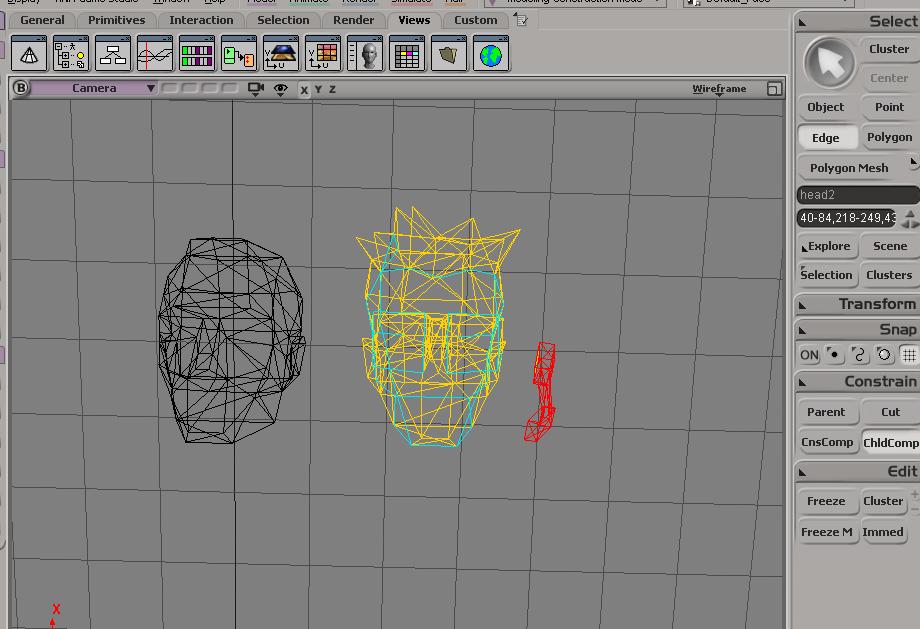
Does someone know how I can move parts from some characters and join them to others ?
example in this photo I was able to isolate the microphone (or whatever u want to call it, the red thing) from com guy's head ... (the yellow one) ... I want to join it to the first head (the black one) ...
I can move the red to position, but I don't know how to cut the relationship between it and the yellow head for good and how to make it part of head 1 ?
I've looked around the options but couldn't figure it out ... if someone knows how I'd appreciate it
pretty please ^_^ ?
Last edited by Samer (10/16/09 13:10)
Join our Oni Facebook Group
Check My YouTube Channel for my Oni Videos.
Check My Wiki page for all my stuff
Offline
#20 10/16/09 18:10
- EdT
- Moderator
- From: Los Angeles, CA
- Registered: 01/13/07
- Website
Re: SoftImage (XSI) Mod Tools - Tips, Techniques and Tutorials
I used another program to separate the microphone. Hopefully, you can use it.
Offline
#21 10/16/09 23:10
- Leus
- Member
- From: Boone, NC
- Registered: 05/28/09
- Website
Re: SoftImage (XSI) Mod Tools - Tips, Techniques and Tutorials
Is this the program everyone's been using to create new characters? AKA mainly Samoko lately?
If we don't change the direction we're going, we'll likely end up where we're headed.
Offline
#22 10/16/09 23:10
- EdT
- Moderator
- From: Los Angeles, CA
- Registered: 01/13/07
- Website
Re: SoftImage (XSI) Mod Tools - Tips, Techniques and Tutorials
This is the program that works best with OniSplit. It can import and export Collada (DAE) files. It can play correctly the TRAM animations. Its just take time to learn how to use it well. But best of all its FREE!
Offline
#23 10/17/09 00:10
- Mukade
- Member
- From: Ottawa, Ontario - Canada
- Registered: 05/29/07
Re: SoftImage (XSI) Mod Tools - Tips, Techniques and Tutorials
no warez required
"He looks mean enough to tear my arm off and beat me to death with it. In fact, he looks mean enough to tear his OWN arm off and beat me to death with it."
Offline
#24 10/17/09 03:10
- Samer
- Member
- From: Lebanon
- Registered: 09/04/09
- Website
Re: SoftImage (XSI) Mod Tools - Tips, Techniques and Tutorials
EdT thanks but I still didn't know how to make it part of the first head .. it imported ok but it is considered as a 20th object which i don't think would be allowed right ?
I'll try my luck with blender maybe there is a more obvious regroup or merge option
Join our Oni Facebook Group
Check My YouTube Channel for my Oni Videos.
Check My Wiki page for all my stuff
Offline
#25 10/17/09 08:10
- EdT
- Moderator
- From: Los Angeles, CA
- Registered: 01/13/07
- Website
Re: SoftImage (XSI) Mod Tools - Tips, Techniques and Tutorials
One of these should help:
http://www.xsibase.com/forum/index.php? … adid=33217
(This looks like a good forum)
Offline